Adding documents
What happens to an upload
An upload is checked, stored, and queued before the response comes back. From there, work happens in the background:
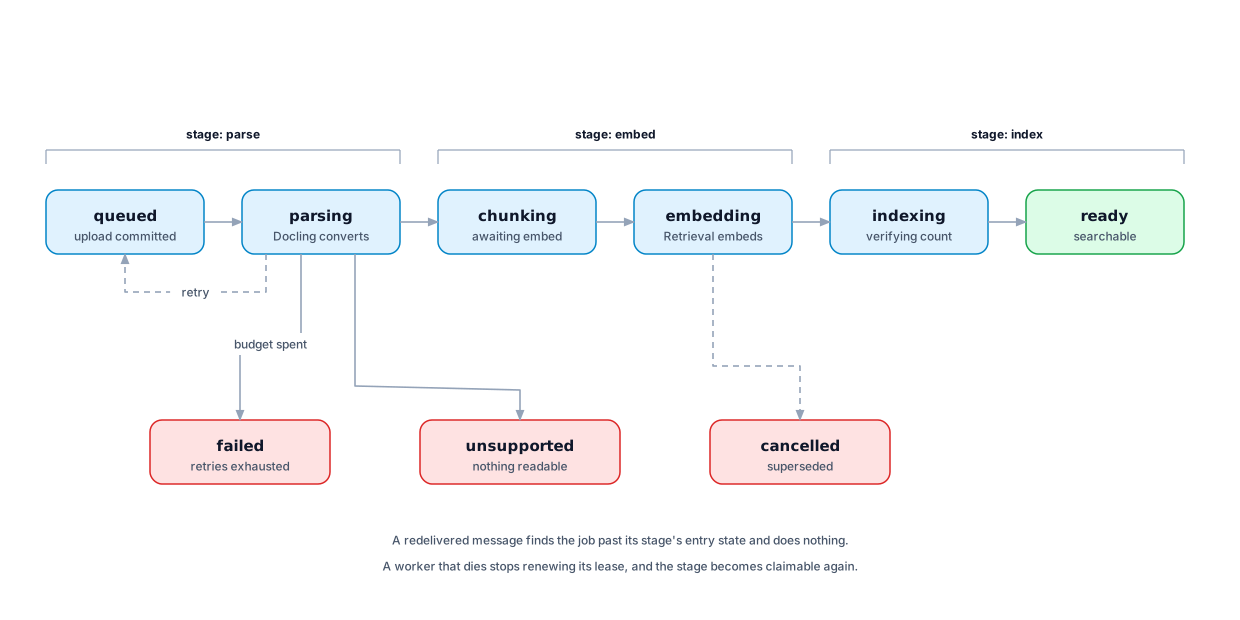
A document reports one of these states while you wait:
| State | What it means |
|---|---|
queued |
Stored and waiting for a worker |
parsing |
Being read and split into passages |
chunking |
Read; waiting to be embedded |
embedding |
Passages being turned into vectors |
indexing |
Written to the index; being checked |
ready |
Searchable |
failed |
Something went wrong; see the detail |
unsupported |
Nothing readable could be found |
Duplicate files
If you upload the same bytes twice, Primer stores them once. Both documents exist independently — different names, different libraries if you like — but the file behind them is shared.
This is invisible from the outside, deliberately. Primer never tells you that a file you uploaded already existed, because that would reveal something about content you cannot otherwise see.
Replacing a document
Uploading a replacement adds a new version rather than overwriting the old one. Older versions stay readable, so a citation made last month still resolves to the text that was actually quoted, not to whatever the document says now.
While a replacement is being indexed, the previous version keeps answering questions. The switch happens in one step when the new index is complete and verified — never halfway.
Rebuilding an index
Reindexing rebuilds a document's passages without re-uploading it. Use it after changing the embedding model, or if a document was indexed while something was misconfigured.
The current index keeps answering throughout. The new build only becomes the answer once it is complete and verified, and a build that fails changes nothing.
Pressing reindex twice does not start two builds. A rebuild already in flight is reported as it stands.
Deleting a document
A deleted document stops being searchable at once. Its passages, metadata, and stored file are removed afterwards, in that order.
The order is deliberate. Passages go first because they are what a search can still reach. The file goes last, and only if no other document uses it: if you and a colleague uploaded the same PDF, deleting yours leaves theirs intact and the file in place.
Deleting a document that is already deleted reports that it is not found, the same as any document you cannot see. It does not schedule a second round of cleanup.
Limits
- Uploads are capped by a size limit the operator sets (100 MB by default).
- Very large documents are refused rather than partially indexed, because a document indexed halfway would answer questions from part of its content with nothing to indicate the rest was dropped.